
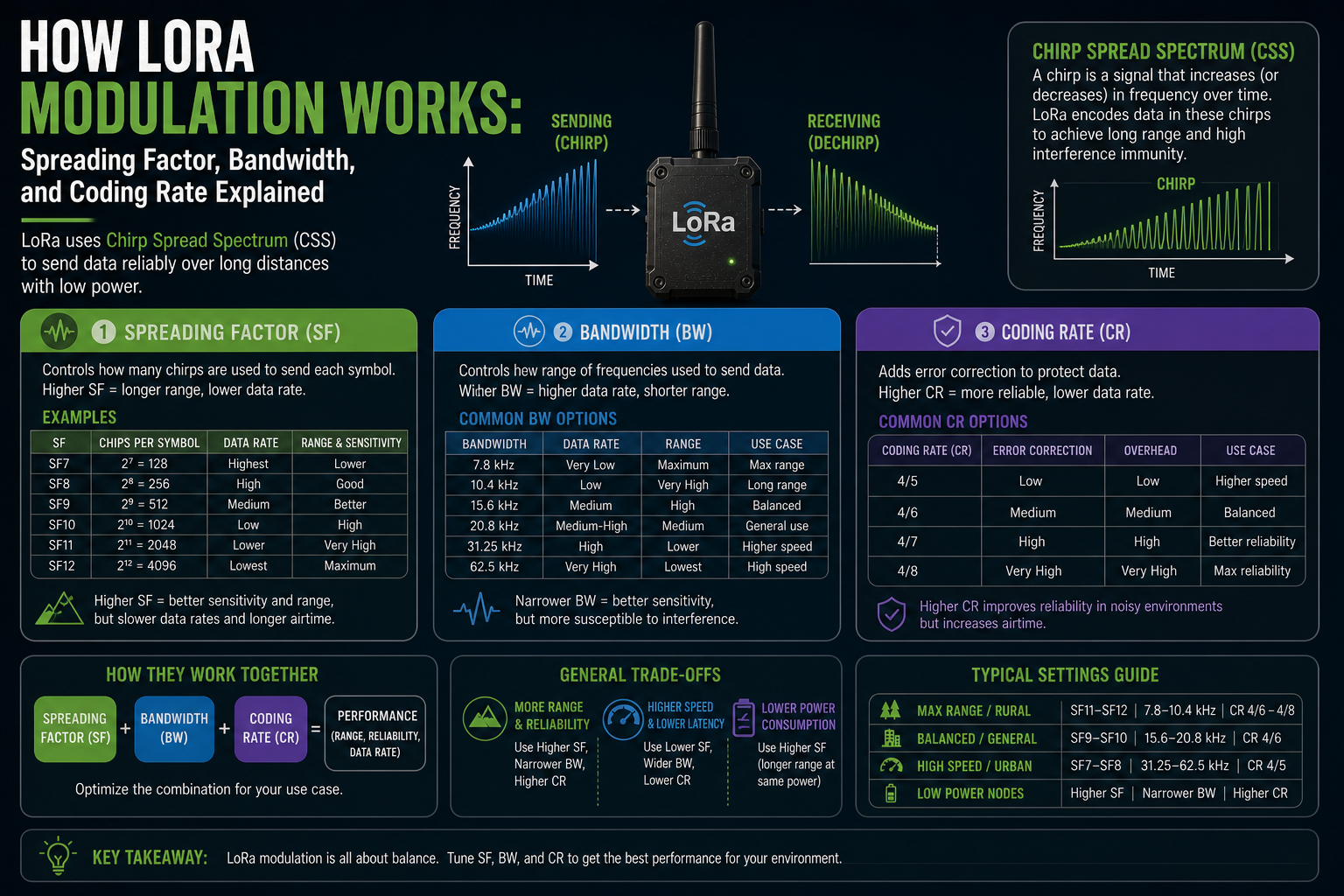
Pick up any LoRa radio module, flip open a datasheet, and three settings will follow you around: spreading factor, bandwidth, and coding rate. Tweak them one way, and your signal reaches twice as far. Tweak them the other way, and your sensor uploads data ten times faster. LoRa modulation is built on those three knobs, and once you understand what each one actually does, the settings stop being magic numbers and start making sense.
LoRa uses a technique called chirp spread spectrum, or CSS. Instead of broadcasting at a fixed frequency, the signal sweeps continuously up or down through a range of frequencies. That sweep is what makes LoRa so good at pulling a signal out of background noise. The spreading factor, bandwidth, and coding rate all shape exactly how that sweep behaves, and in turn, how your radio performs in the real world.
The big three and what they control
The simplest way to think about it: spreading factor controls how much time you spend sending each symbol, bandwidth controls how wide a slice of spectrum that symbol occupies, and coding rate controls how much error-correction redundancy you attach. All three affect range, speed, and battery life at once. Spreading factor is the dominant one by a significant margin.
Spreading factor: the most important setting
Spreading factor, usually written as SF, runs from SF7 (the fastest setting) up to SF12 (the longest range). The number represents how many chips are used to encode each data symbol. At SF7, each symbol takes 128 chips. At SF12, each symbol takes 4,096 chips.
That matters because more chips per symbol means the receiver can spend more time searching for the signal in the noise. The sensitivity improvement amounts to roughly 2.5 dB per step, so the difference between SF7 and SF12 is about 15 dB in link budget. In practical terms, that can more than double the usable range in open terrain.
The cost is time on air. Each step up in SF doubles how long it takes to transmit the same payload. A short Meshtastic message that takes around 100 ms at SF7 will take over three seconds at SF12. That is not a rounding error. In a mesh network where dozens of nodes might relay the same packet, a high spreading factor means the channel gets congested fast.
Each LoRa-based system exposes the spreading factor differently. Meshtastic wraps it in named channel presets: LongFast is a reasonable middle ground for most deployments, LongSlow pushes to SF12 for extreme range, and ShortFast uses SF7 for dense urban meshes where speed matters more than distance. MeshCore follows a similar pattern, letting you pick channel configurations that map to specific SF and bandwidth combinations. LoRaWAN devices often do not expose SF directly to the user at all: the network server manages it automatically through adaptive data rate, selecting the fastest SF that the link quality will support.
Bandwidth: speed versus noise floor
Bandwidth is the width of the frequency slice the chirp sweeps across. Common values are 125 kHz, 250 kHz, and 500 kHz.
Doubling the bandwidth roughly halves the time on air, because the chirp sweeps faster through the same spread of chips. That is useful for throughput. The trade-off is sensitivity: a wider channel admits more noise, degrading receiver performance by about 3 dB per doubling of the channel width. So 250 kHz is about 3 dB noisier than 125 kHz, and 500 kHz is about 6 dB noisier than 125 kHz.
A 3 dB loss may sound minor, but at the edge of a link's range, it can mean the difference between a message getting through and not. For deployments in Europe, whether LoRaWAN sensors, a Meshtastic mesh, or a MeshCore network, 125 kHz is a common choice because it offers the best sensitivity. Wider bandwidths make more sense when nodes are closer together, and you want to shift data quickly without burning extra channel time.
Bandwidth also affects how well the radio tolerates frequency error between transmitter and receiver. A wider channel is more forgiving of slight mismatches, which matters with budget oscillators that drift with temperature. Worth knowing if you are using low-cost hardware outdoors.
Coding rate: the quiet error-correction knob
Coding rate adds redundancy to the data so the receiver can correct errors even if parts of the transmission were corrupted. It is expressed as a ratio: 4/5, 4/6, 4/7, or 4/8.
Read it as "for every 4 bits of payload, this many bits are actually transmitted". At 4/5, you add one extra error-correction bit per four payload bits: a 25% overhead. At 4/8, four extra bits are added, doubling the transmission size. The higher the denominator, the more the signal can recover from interference, but the longer it takes to send.
In calm RF environments with a strong signal, CR 4/5 is usually the right choice. It minimises airtime and keeps duty cycle low. CR 4/8 is mainly useful when the link is consistently noisy and other settings cannot compensate, such as in dense urban deployments or when operating near other devices on adjacent frequencies.
In practice, coding rate has a modest effect on performance compared to spreading factor and bandwidth. Most LoRa systems default to CR 4/5, including Meshtastic, MeshCore, and most LoRaWAN device profiles. Switching to 4/8 is a last resort, not a first choice.
How they interact: range, speed, and airtime all at once
The three parameters feed into a single output: the radio link's bit rate. Bit rate determines both how fast data moves and how long each packet spends in the air. Longer time on air means more battery used per transmission, more congestion on the shared channel, and more exposure to interference.
A higher spreading factor dramatically decreases the bit rate. Wider bandwidth increases it. Higher coding rate decreases it slightly.
The extremes tell the story clearly: a link set to SF7, 250 kHz, and CR 4/5 pushes tens of kilobits per second, while one at SF12, 125 kHz, and CR 4/8 crawls along at under 200 bps. Both are valid. Neither is universally better.
There is also an important regulatory dimension. In the EU, LoRa devices operating in the 868 MHz band are subject to a 1% duty cycle limit in most sub-bands, meaning a device can transmit for only 36 seconds per hour on a given channel. A high spreading factor means each packet takes much longer to send, which eats into that budget faster. Any LoRa device operating at a high spreading factor with frequent transmissions will hit that duty cycle ceiling much sooner than one using a faster, lower-SF configuration. A Meshtastic node on LongSlow or a LoRaWAN sensor sending frequent uplinks are both vulnerable to the same constraint.
The honest trade-offs
There is no setting that gives you long-range, high-throughput, and low channel congestion simultaneously. LoRa forces a trade-off at every step.
Higher spreading factors give you range and sensitivity, but you pay in time on air, battery life, and channel capacity. Wider bandwidth gives you speed, but costs sensitivity. Higher coding rate improves error resilience, but adds overhead. Every channel or modem configuration, whether a Meshtastic preset, a MeshCore channel profile, or a LoRaWAN device data rate setting, is a specific point in that trade-off space, chosen for a particular type of deployment.
Not every situation benefits from maximising range. A node at the edge of the SF12 range may receive packets intermittently, with long gaps and unpredictable delivery. A node operating at a lower spreading factor in better RF conditions will often deliver messages faster and more reliably than an SF12 link barely staying alive.
How Meshtastic, MeshCore, and LoRaWAN each use these settings
Spreading factor, bandwidth, and coding rate are not Meshtastic-specific. They are the fundamental controls for every LoRa radio, regardless of what software runs on top of it. Every network planner, firmware developer, and hardware selector faces the same trade-off matrix.
In LoRaWAN, the network server typically manages the spreading factor automatically through adaptive data rate. The device starts at a conservative SF and the server steps it down as signal quality improves, maximising throughput while maintaining link reliability. You rarely set SF by hand in a LoRaWAN deployment, but the constraint is always there.
In Meshtastic, you choose SF indirectly by selecting a channel preset. Understanding what LongSlow or LongFast actually mean in terms of SF, bandwidth, and time on air helps explain why some presets work well in a sparse rural mesh and others are better suited to a busy urban one.
MeshCore exposes similar controls through its channel configuration. The same logic applies: higher SF for better range and noise resistance, lower SF when nodes are close, and message speed matters more than raw distance. If you are running a mixed network, all nodes on the same channel must share identical SF, bandwidth, and coding rate settings, or they simply will not hear each other.
Once you have the basics down, the natural next step is understanding how time on air is calculated and what the duty cycle rules mean for your region. Those numbers are what actually limit how often a LoRa network can transmit, and they follow directly from the three parameters covered here.
The settings look like configuration details. They are actually the entire physics of the link budget, packed into three numbers. Get them right for your use case, and LoRa does something remarkable. Get them wrong, and you will wonder why your range is worse than everyone else's despite using the same hardware.