
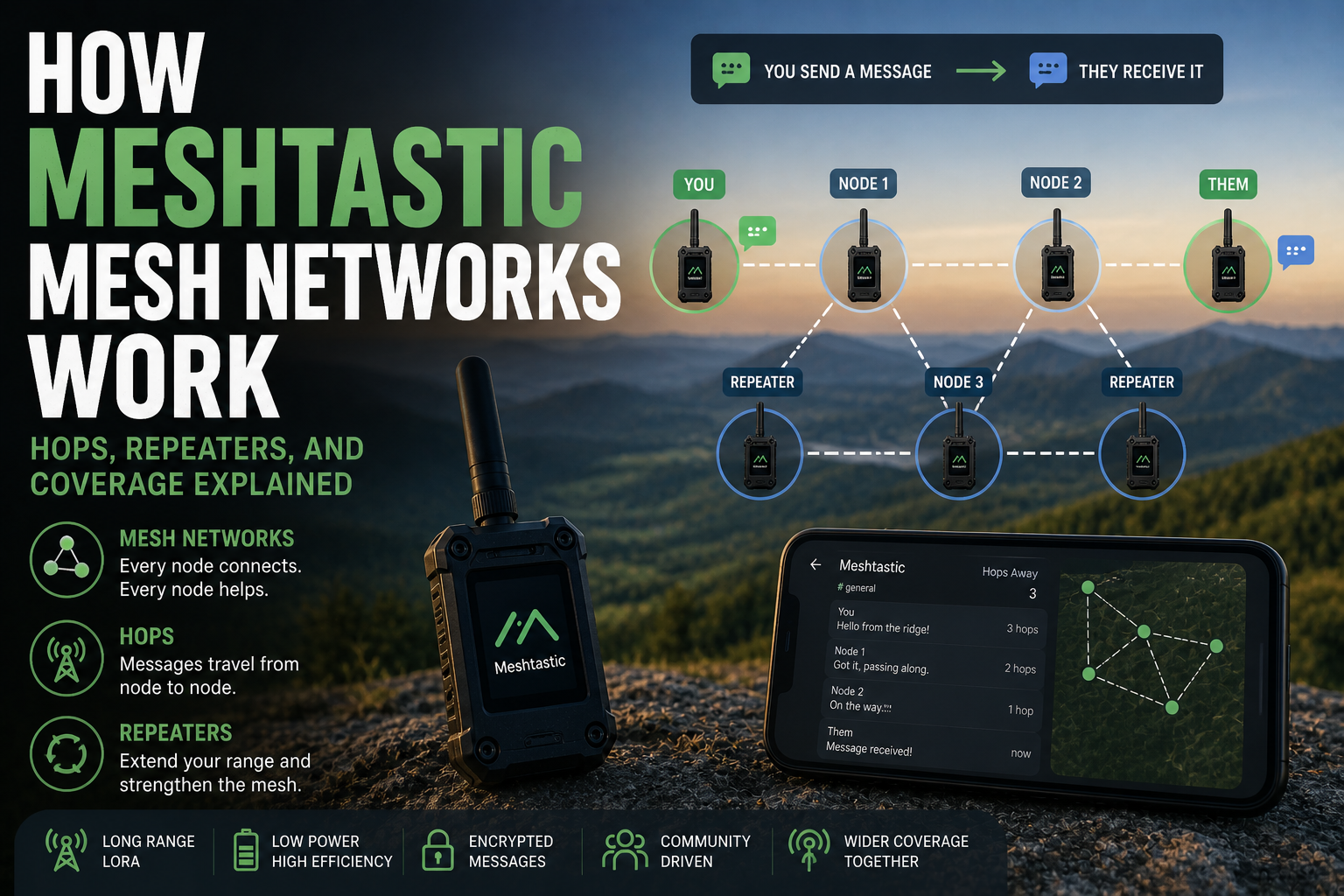
You send a message from a valley campsite to a friend on the other side of a hill, two kilometres away, with no mobile signal in sight. A few seconds later, they get it. What happened in between is the part that is actually interesting.
Meshtastic is built on a concept called mesh networking, and understanding how the mesh works explains a lot about why it performs the way it does, what the practical limits are, and how you can make the most of it. The words hops, repeaters, and coverage get thrown around a lot in Meshtastic discussions, so here is what they actually mean.
Each message travels in hops, not in one leap
When you send a message on Meshtastic, it does not travel directly from your device to the destination. Instead, it gets broadcast out into the air and picked up by any nearby node. That node rebroadcasts it. The next node picks it up and does the same. This process repeats until the message reaches its destination, or until it has been forwarded the maximum number of times allowed.
Each one of those rebroadcasts is a hop. A message that goes directly from your device to another with no intermediaries is a one-hop message. A message that passes through two intermediate devices before arriving is a three-hop message.
The default hop limit in Meshtastic is three. That means a message can pass through up to three intermediate nodes before it stops being forwarded. This limit exists for good reason: without it, messages would bounce around indefinitely, swamping the radio channel with repeated broadcasts.
How nodes decide whether to forward a message
Meshtastic uses a technique called managed flooding. When a node hears a message it has not seen before, it rebroadcasts it. When it hears a message it has already forwarded, it ignores the duplicate.
There is no routing table, no clever pathfinding, no central coordinator deciding the best path through the network. Every node that hears a message and has hops remaining simply passes it on. This is what makes the network so robust: there is no single path that must work, and no one node whose failure breaks communication.
The trade-off is efficiency. In a dense network with many nodes, a single message might be rebroadcast dozens of times by dozens of nodes before everyone has heard it. This is fine when the network is small and quiet. In a very busy network with many nodes sending frequently, the radio channel can become congested. The mesh copes, but it slows down.
What a repeater node actually does
A repeater in Meshtastic is just a regular node configured to forward messages rather than act as a user endpoint. It still runs the same firmware, still participates in the mesh the same way. The difference is that it is placed deliberately to extend coverage rather than to serve a specific person.
The most useful repeater placements are elevated ones. A node on a hill, a rooftop, or a tall building can hear messages from nodes that cannot hear each other directly. By forwarding those messages, it bridges two otherwise disconnected parts of the network.
That’s where a lot of the practical magic in Meshtastic comes from. Two nodes separated by a hill and completely out of range of each other can still communicate via a repeater sitting on the ridge above them. The hill stops direct communication but the repeater sees both sides.
How coverage actually builds up
A single Meshtastic node covers a rough circular area determined by its radio settings, antenna, and surroundings. In a suburban area, that might be one to three kilometres. On a rooftop in open country, it could be considerably more.
With multiple nodes, those circles start to overlap. Messages can hop from one coverage area to the next, effectively extending the total reach of the network well beyond what any single node could achieve.
This is why the number and placement of nodes matters more than the raw power of any individual one. A single high-powered node cannot bridge a twenty-kilometre gap. Three nodes placed sensibly across that distance, each in range of the next, can.
The practical implication: the more people in an area who run Meshtastic nodes, the more useful the network becomes for everyone. A node left running at home, even on minimal power, contributes to coverage in your area that other people can use.
Node roles: not all nodes behave the same
Meshtastic lets you assign a role to each node, and this shapes how it participates in the mesh. Roles range from a basic Client to dedicated Routers, Repeaters, Sensors, and Trackers. The full breakdown is here.
The hop limit and why you should not just raise it
If three hops means the message travels through three intermediate nodes, it seems like raising the hop limit would extend range. And technically it does. But there is a significant cost.
Every extra hop means every node in range rebroadcasts again. In a network with any reasonable number of nodes, raising the hop limit from three to five roughly doubles the amount of radio traffic generated by a single message. That extra traffic occupies the channel and slows everything else down.
The default of three is a deliberate balance. For most practical networks, three hops is enough to reach across a well-covered area. If messages are not getting through, the answer is usually a better-placed node, not a higher hop count.
Coverage planning in practice
Building coverage in a real area means thinking about geography first. Where are the natural barriers? Where are the elevated points? Where do people actually go and need to communicate?
A node on the highest accessible point in your area is almost always the highest-value addition to any local network. It can see further, hear more nodes, and bridge more gaps than ten ground-level nodes can. After that, the goal is filling in dead zones created by buildings or terrain.
For outdoor use, the mesh works best when nodes are distributed along the route rather than clustered at one end. A hiking group spread out over several kilometres gets much more reliable communication if a couple of the group carry nodes that can act as relays, rather than hoping direct device-to-device range will be enough.
An honest look at the limits
Mesh networking is not magic. The hop-and-flood approach has genuine strengths: it is simple, resilient, and requires no configuration. But it does not scale to very large, dense networks without degradation. A city-wide Meshtastic network with hundreds of active nodes sending messages constantly would struggle with channel congestion in ways that a small rural network would not.
For the use cases Meshtastic is actually designed for, though, these limits rarely matter. Small group communication, emergency backup, outdoor adventures, community local networks: all of these stay well within the practical range of what managed flooding handles well.
The mesh does not need to be perfect. It just needs to be good enough when everything else has stopped working.