
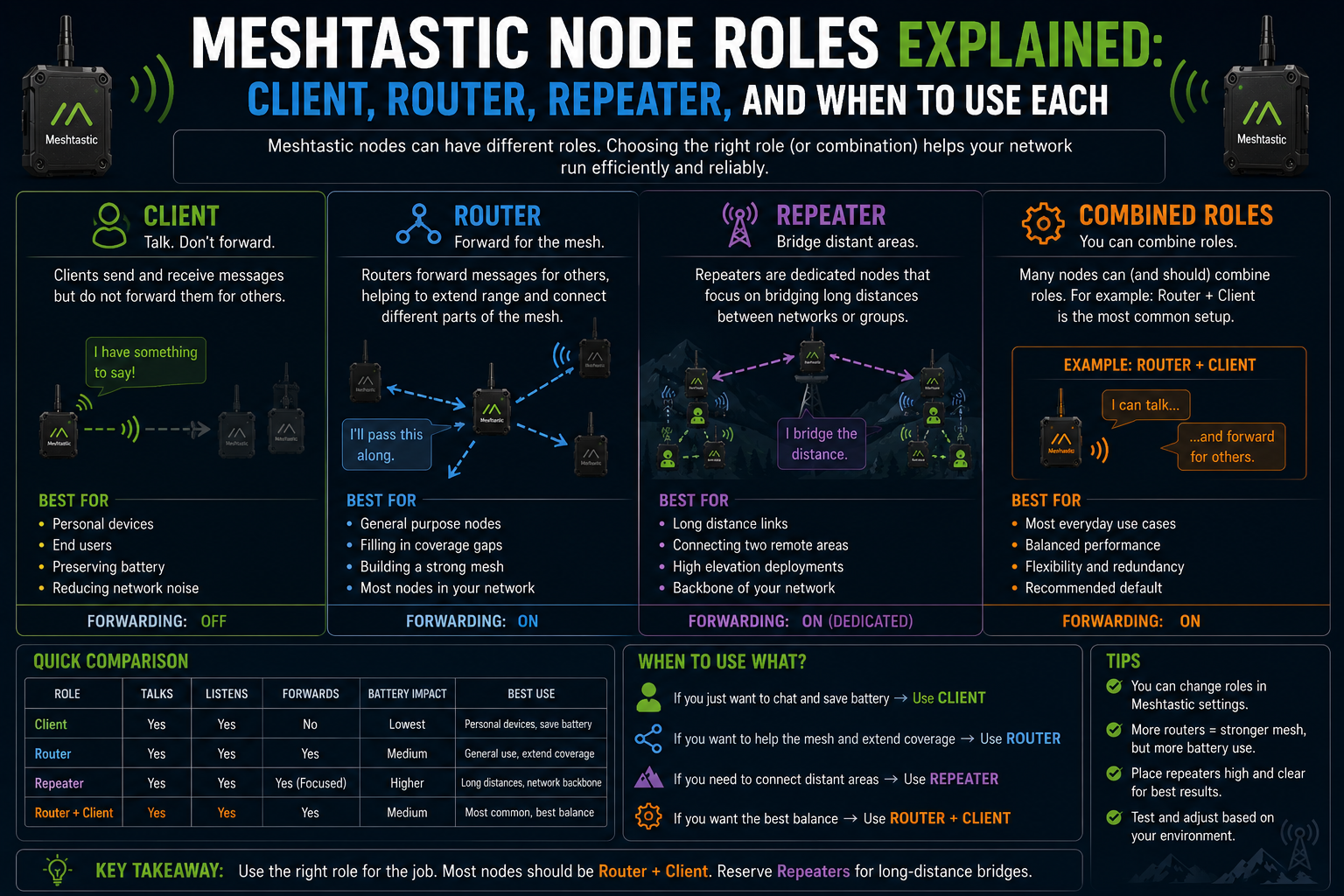
You open the Meshtastic app, go into a node’s settings, and find a dropdown labelled Role. The options are Client, Client Mute, Client Base, Router, Router Client, Repeater, Sensor, Tracker, and TAK. Most first-time users pick Client because it’s the default and move on. That’s fine to start with. But understanding what each role actually does is one of those things that quietly makes your whole network perform better.
Meshtastic node roles control how a device participates in the mesh. Not just whether it sends your messages, but whether it forwards other people’s messages, how aggressively it does so, and whether it even appears on anyone’s node list. The right role depends on what you actually want the node to do.
How roles affect the mesh
When a node hears a packet, it decides whether to rebroadcast it. That decision is shaped by the node’s role. A node configured as a Client uses a random backoff timer before rebroadcasting: it waits a short, random interval to avoid colliding with other nearby nodes that are doing the same. A node configured as a Router uses a shorter, more predictable backoff and is given priority when the mesh is deciding which device should relay a particular packet.
This matters in practice. In a dense area with many nodes all hearing the same packet, multiple simultaneous rebroadcasts cause collisions and congestion. The role system is how Meshtastic manages that: some nodes step forward quickly, others yield, and the network ends up with fewer redundant transmissions doing the same work.
Client: The default for devices you carry
Client is the right role for any device you actively use and carry around. It sends your messages, forwards packets when it can, and appears on the node list for everyone nearby. The random backoff means it does not aggressively compete for relaying, which is sensible when there are other, more permanently placed nodes around.
In a well-designed network, Client nodes sit at the edges. They are the people in the field, the hikers, the people at an event. They rely on Router or Repeater nodes to bridge the gaps between them, but they also contribute to coverage when no other node is nearby.
Client Mute is the same as Client, but with packet forwarding turned off entirely. Useful for a second device you carry alongside a main node, or for testing, so that it does not interfere with the mesh by adding unnecessary rebroadcasts from a device sitting in a bag next to one that is already doing the job.
Client Base: priority relaying for your home station
Client Base is designed for multi-device setups where you have a well-positioned node at home. Think attic or rooftop. It behaves like a Client but gets priority when rebroadcasting messages to or from any nodes you have marked as favourites.
The typical pattern: set your best-placed node to Client Base, then add your other devices as favourites on it. Those favourited nodes get relay priority through the base station. Your other devices run as Client or Client Mute. It is a cleaner approach than Router for home use when you want that extra relaying advantage without the full infrastructure implications.
Router: dedicated forwarding at the front of the queue
A Router node uses a shorter, deterministic backoff. When multiple nodes hear the same packet, the Router is typically the first to relay it. It also uses Meshtastic’s neighbour-awareness to avoid relaying a packet that a better-positioned node has already handled.
This makes Routers the right choice for fixed nodes at elevation or in strategic locations to serve a wider area. A Router on a rooftop or hilltop should get the message out before the half-dozen Client nodes at ground level all try to do the same thing.
The trade-off is that a Router is still a full node in the mesh. It appears in the node list, it sends telemetry, and it responds to position requests. If you want a node that does all of that and forwards efficiently, Router is the right pick. If you want something that is purely infrastructure and invisible, that is the Repeater role.
One thing to avoid: making everything a Router. In a dense network where every node is trying to relay aggressively, you end up with more collisions, not fewer. Routers are most effective when they are the exception in their area, not the rule.
Router Client: the best of both for home nodes
The Router Client is a hybrid role, and it is probably the most practical for a semi-permanent home node.
It forwards packets with the same priority and backoff as a Router, but it also participates in the mesh as a regular node. You can interact with it from the app, see its position, use it for messaging, and it will show up in your node list alongside everyone else.
For a node that sits on a shelf or a windowsill, stays plugged in, and serves double duty as both your personal home node and a relay for your neighbourhood, Router Client is usually the right choice. It does not give up personal functionality for the sake of infrastructure, and it still behaves well in the forwarding queue.
Repeater: invisible infrastructure
A Repeater node does one thing: it hears a packet and rebroadcasts it as quickly as possible. That is the entire job description.
It does not appear in anyone’s node list. It sends no telemetry. It does not accept messages addressed to it. As far as the network is concerned, it is part of the plumbing rather than a participant. If you are building a fixed node specifically to extend coverage, with no intention of using it as a personal device, Repeater is the cleanest choice.
Repeaters are particularly effective on hilltops, rooftops, and relay points where the node has a good line of sight over a wide area but no human is there to use it. Because they relay aggressively and quickly, they snap up packets that might otherwise be delayed by a pile-up of Client nodes with random backoffs.
The practical downside is that you lose observability. You cannot message the node or see it in the node list to check it is still running. For a remote outdoor installation, that can matter. Some people use a Router node instead, accepting slightly more overhead in exchange for being able to see whether the node is alive.
Sensor: telemetry-first devices
The Sensor role is for nodes whose main job is collecting and transmitting data. Weather stations, environmental monitors, air quality sensors. The device still routes messages for others, but it prioritises getting its own telemetry out even when channel utilisation is high.
Pair this role with power saving enabled and the device will sleep between transmissions, which can dramatically extend battery life on a field-deployed sensor node. If you are building something that spends most of its time measuring and reporting rather than relaying, Sensor is the right fit.
Tracker: GPS-first devices
The Tracker role is for devices primarily used to track the location of people, vehicles, or assets. It sends Position packets at higher priority so location data gets through even when the channel is busy. Like Sensor, it still participates in routing, but location reporting comes first.
Combining Tracker with power saving puts the device to sleep between position updates, which is the sensible approach for anything battery-powered that just needs to report where it is at regular intervals rather than staying on the network continuously.
TAK and other roles
The TAK role is intended for use with ATAK, the Android Team Awareness Kit used in military and emergency services contexts. Unless you are specifically building a Meshtastic integration with TAK software, you can ignore it entirely. It adjusts the firmware’s messaging behaviour to fit the TAK protocol rather than the standard Meshtastic message format, which will break compatibility with regular Meshtastic devices on the same channel.
The question worth asking before you pick a role
Before choosing a role, ask one question: What do I actually want this node to do?
If it is going in your pocket, use Client. If you have a well-placed home node and want it to prioritise your other devices, use Client Base. If it is sitting at a height to extend coverage and you still want to use it from an app, use Router Client. If it is infrastructure-only and there is no need to interact with it, use Repeater. If it is a fixed relay in a location with some human interaction but mainly forwarding duty, Router is fine. If it is a second device you carry alongside your main one, Client Mute stops it from adding noise. If it is a sensor or tracker, use the matching role and enable power saving.
Most people who have been running Meshtastic for a while end up with a mixture: Client devices on the move, one or two Router Client nodes at home or in the office, and occasionally a dedicated Repeater on a nearby high point. The roles are not competing options. They are complementary, and the network works best when each node does the job it was designed to do.