
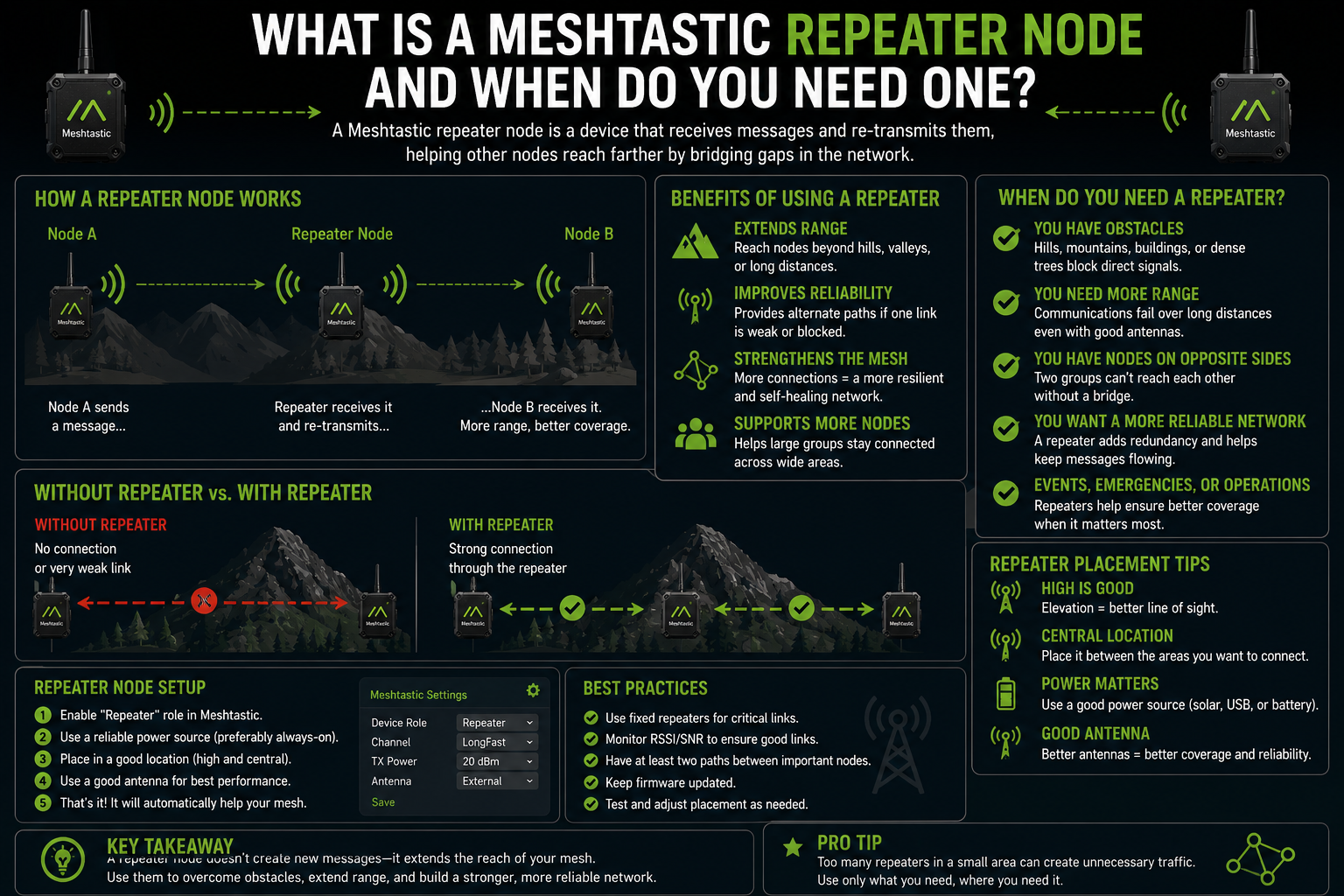
There is a hill between you and your friend. It is not enormous, maybe 80 metres of elevation, but it is enough. Your Meshtastic nodes are both running. The app shows you connected to the mesh. But no matter how many times you tap send, nothing arrives on the other side.
This is the problem a Meshtastic repeater node solves. It sits somewhere above the obstacle, sees both sides, and passes messages between them. It does not need a human watching it. It just runs, relaying packets, making the mesh useful in places where it would otherwise have gaps.
What a repeater node actually does
Every Meshtastic node can forward packets. That is part of how the mesh works: messages hop between devices until they reach their destination or exceed the allowed number of hops. But most devices you carry or keep at home do other things, too. They are updating their position. They are sending telemetry. They are receiving packets from your phone over Bluetooth. They have competing priorities.
A repeater node strips all of that away. Its only job is to hear a packet and rebroadcast it. No GPS. No Bluetooth. No screen. No user interaction. Just radio in, radio out, as fast and reliably as possible.
In Meshtastic's node role settings, this is literally called repeater. Selecting it turns off most other functions, reduces the node's own transmissions to a minimum, and tunes the forwarding algorithm to prioritise speed and reliability over anything else.
When you actually need one
Not every Meshtastic setup needs a dedicated repeater. Two people in the same park, a family camping in a field, a group hiking along a ridge with clear sightlines: in those situations, the mesh works fine without any fixed infrastructure.
You need a repeater when there is a physical obstacle that neither side can see through or around. The most common scenarios:
A hill, ridge, or valley that separates two parts of a coverage area
A dense urban area where buildings break the mesh into isolated pockets
A long corridor with too much distance for a single hop
An indoor environment where floors or thick walls prevent reliable direct links
The tell-tale sign is a consistent dead zone. If there is a specific location where messages reliably stop getting through, and the problem is clearly geographical rather than configuration, a well-placed repeater will fix it.
Placement is everything
A repeater node on the ground, surrounded by buildings, is not much better than no repeater at all. The whole point is elevation. A repeater works because it can see both sides of a link that cannot see each other directly, which requires a clear radio path to both ends.
The ideal placement is a rooftop, a hilltop, a water tower, a church spire, or a tall tree. Anywhere that has a direct line of sight over the terrain between the two points you are trying to connect. Getting a repeater just 10 to 15 metres above ground level in a suburban area can bridge gaps that ground-level nodes cannot cross.
Even within a building, height helps. A repeater on the top floor, near a window, will serve the floors below it far better than one in a basement cabinet.
Hardware for a repeater node
Almost any Meshtastic-compatible device can act as a repeater. The practical question is power and weatherproofing, because a useful repeater runs continuously.
Indoor repeaters can be a small board plugged into a USB charger. A T-Beam or Heltec device with the role set to repeater, connected to a decent external antenna pointed at the sky, is a perfectly good indoor repeater and costs very little to run.
Outdoor repeaters need more thought. The device needs to be protected from rain, condensation, and temperature extremes. Many people use weatherproof enclosures, sometimes with a small solar panel and a LiPo battery, for sites where mains power is unavailable. The antenna should be an outdoor-rated unit mounted on a mast or pole rather than the stock stub that ships with most boards.
For a long-term outdoor deployment, getting the antenna outside the enclosure is essential. An antenna inside a sealed plastic box works, but an antenna on a short mast above the box, connected by a short run of coax, works considerably better.
The difference between Repeater and Router roles
Meshtastic offers both a Repeater role and a Router role, and the distinction matters.
A Router node forwards packets efficiently and also participates in the mesh as a regular node. It can receive messages addressed to it, report telemetry, and interact with the app. It is a good choice for a semi-permanent, fixed home node that you also want to use.
A Repeater node is more aggressive. It does not accept messages addressed to it from the app in the normal sense. It prioritises forwarding over everything else. Think of it as infrastructure, not a personal device. Pick the Repeater role when you are deploying something specifically to extend coverage, not when you want a device you will also actively use.
There is also a Router Client role, which sits between the two: it forwards packets efficiently but still behaves as a usable node. This is often the right choice for a home node that doubles as infrastructure.
How many hops does a repeater use
Each time a node forwards a packet, it uses one hop. By default, Meshtastic allows a message to be forwarded up to three hops before it stops being forwarded. A single repeater in the middle of a chain uses one of those hops, leaving two for the rest of the journey.
For most setups, this is fine. If you are building a long multi-hop chain, you may need to increase the hop limit, though doing so on a busy network increases rebroadcasting and can cause congestion. The default of three hops covers the vast majority of practical deployments.
Testing whether you need one
Before committing to a permanent repeater installation, it is worth doing a simple test. Take a portable node to the location where you plan to place the repeater, leave it running for a few minutes, and see whether the gap closes. If messages start flowing that previously did not, you have found your answer.
This test also helps you evaluate whether your chosen position is actually good enough. A hilltop that sounds perfect on a map might have tree cover or a building blocking the exact direction you need. Testing first saves a wasted installation.
Once you have confirmed the location works, the permanent hardware can be a much more modest device than your test unit. A small, low-power board with an outdoor antenna and a reliable power supply is all you need. It will sit there quietly and make everything else work better, which is exactly what good infrastructure should do.