
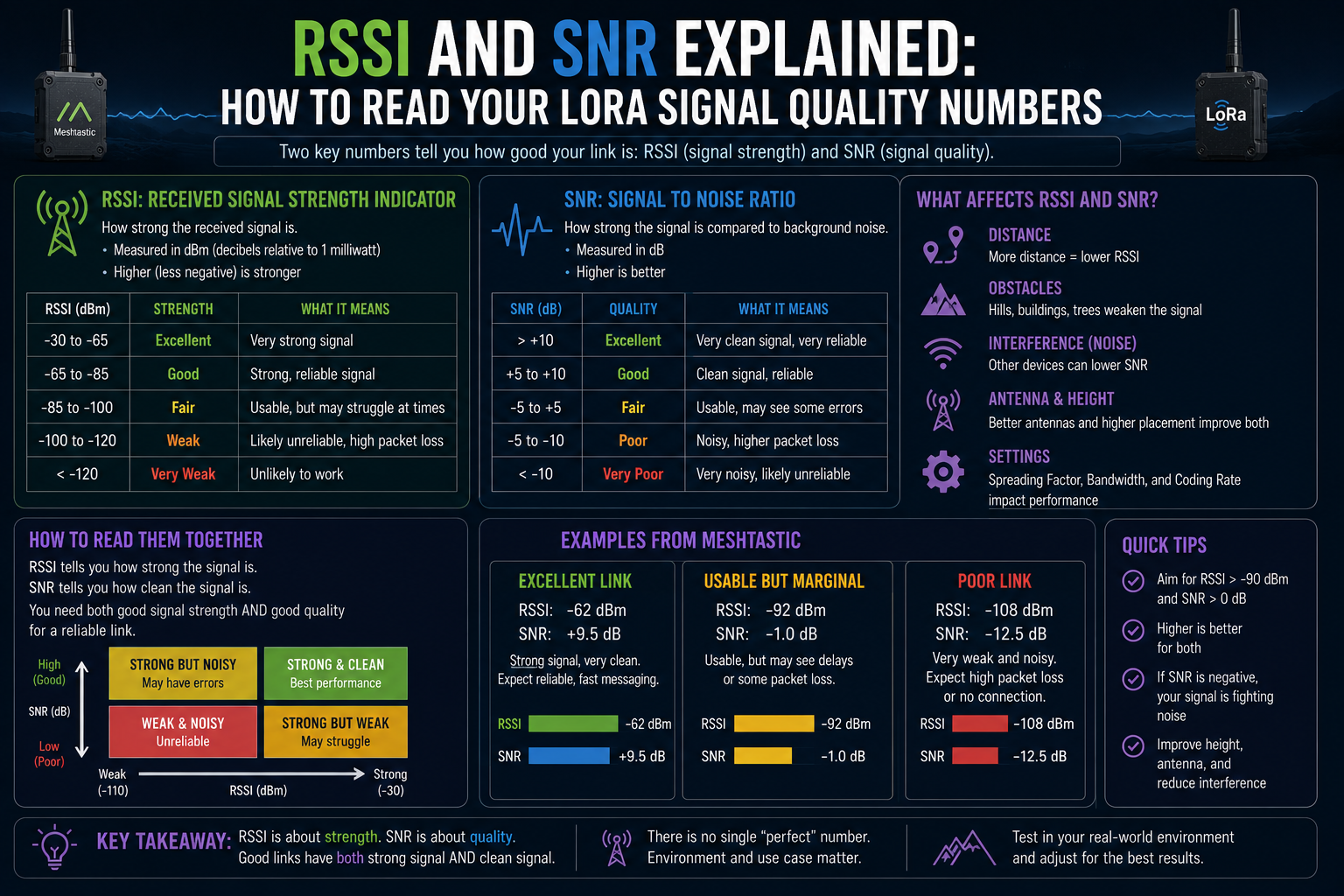
You send a test message across town. It arrives. You tap the message in the Meshtastic app and a small block of diagnostic info appears: RSSI -108 dBm, SNR -7 dB. Useful, probably. But if you have never had anyone explain what those numbers actually mean, they might as well be arbitrary.
RSSI and SNR are the two signal quality numbers you will see most often when working with LoRa radio, and both are worth understanding. They tell different things about the health of a link, and knowing which one to watch, and when, makes troubleshooting a lot less mysterious.
RSSI: how loud the signal is
RSSI stands for Received Signal Strength Indicator. It measures the power level of the incoming radio signal at the receiver. The unit is dBm, which is decibels relative to one milliwatt. In practice, you will never see a positive RSSI from a radio link at any sensible distance. The numbers are always negative, and the closer to zero, the stronger the signal.
Think of it as a scale from pretty strong to nearly nothing. An RSSI of -50 dBm is a very strong signal, the kind you might see with two nodes a few metres apart. An RSSI of -120 dBm is right at the edge of what the receiver can hear at all. Most practical Meshtastic links in suburban areas fall somewhere between -80 and -115 dBm.
As a rough guide:
Above -90 dBm: strong signal, reliable link
-90 to -105 dBm: decent signal, should work consistently
-105 to -115 dBm: marginal but often usable, especially with LoRa
Below -115 dBm: very weak, expect missed packets
These are guidelines, not hard thresholds. Whether the link actually works at a given RSSI depends heavily on the SNR, which is where it gets interesting.
SNR: how clean the signal is
SNR stands for Signal to Noise Ratio. It measures how much the signal stands out above the background noise on the radio channel. The unit is plain dB. A positive SNR means the signal is louder than the noise floor. A negative SNR means the signal is actually buried below the noise.
That last sentence is where LoRa does something genuinely unusual.
Most digital radio technologies need the signal to be clearly above the noise floor to work at all. LoRa, using a technique called chirp spread spectrum, can decode signals that are 20 dB or more below the noise floor, depending on the spreading factor in use. This is the core reason LoRa achieves such long range on such low power. It does not need a loud signal; it needs a recognisable pattern even when everything is noisy around it.
As a practical guide for Meshtastic links:
SNR above +5 dB: very clean link, plenty of margin
SNR 0 to +5 dB: good, signal clearly above the noise
SNR -5 to 0 dB: fine for LoRa, working as intended
SNR -10 to -15 dB: approaching the limit, packets may occasionally be lost
Below -15 dB: at or past the demodulation threshold, unreliable
The exact threshold depends on the spreading factor. Higher spreading factors (SF10, SF11, SF12) can pull a signal out of deeper noise than lower ones. If you are running a long-range Meshtastic preset with a high spreading factor, an SNR of -12 or -13 is still usually decodable. On a faster preset using SF7, the same SNR would likely mean a failed packet.
Which number matters more
Both, but for different reasons. RSSI tells you about signal strength. SNR tells you about signal quality relative to the environment. You need both pieces of the picture.
A strong RSSI with a poor SNR usually means the radio environment is noisy. You are close enough to hear the other node, but there is a lot of interference competing with the signal. This is common in dense urban areas with many Wi-Fi networks, Bluetooth devices, and other radios sharing the same spectrum region.
A weak RSSI with a decent SNR means you are at the edge of the link's range but the channel is relatively clean. This is the typical profile for a long-distance rural link. The signal is faint, but LoRa can still work with it because there is not much noise competing with it.
If both are bad at the same time, you are either too far away or something is blocking the path.
Where to find these numbers
In the Meshtastic app, tap on any received message or node in the node list and look for the signal info. The exact location varies slightly between the iOS and Android apps, but both surface RSSI and SNR for the most recently received packet from that node.
Keep in mind that these numbers reflect the signal at the receiving end, not at the transmitter. If you see a bad RSSI reading for a node that is nearby, check which direction the packet travelled. RSSI and SNR are always reported from the perspective of the device that received the packet. A distant node relaying a message from somewhere else will show the signal quality of the last hop, not the full path.
Using these numbers to diagnose a link
RSSI and SNR are most useful when something is not working and you want to understand why.
If RSSI improves when you raise the antenna but SNR stays poor, you are dealing with a noise problem, not a range problem. More height brings in more signal but also more interference if the noise source is nearby. If both RSSI and SNR improve with height, the issue was simply line of sight. Raising the node is solving the actual problem.
If SNR fluctuates wildly while RSSI stays roughly constant, look for interference that comes and goes. A nearby device cycling on and off, or a neighbour's Wi-Fi router on a clashing channel, can cause exactly this pattern.
If packets fail to arrive even though RSSI and SNR look acceptable, check that all nodes are on the same channel and modem preset. A configuration mismatch is completely invisible to the signal quality numbers but will silently cause everything to fail.
The bigger picture
RSSI and SNR are diagnostic tools, not scoreboards. A link with an RSSI of -112 dBm and an SNR of -8 dB that reliably delivers every packet is a good link. A link with an RSSI of -80 dBm and an SNR of -14 dB that drops half its messages is not. The numbers help you understand what is happening; the packet success rate tells you whether it matters.
Most people who get into Meshtastic start by chasing strong RSSI readings. After a while, you start watching the SNR column instead. That shift in attention usually means you have moved from getting the hardware working to actually understanding how the radio behaves in your environment. The numbers become a map, and the mesh starts to make more sense.